
The Contractor Workflow
From bid to report — how Excavata supports every stage of a professional archaeology contract.
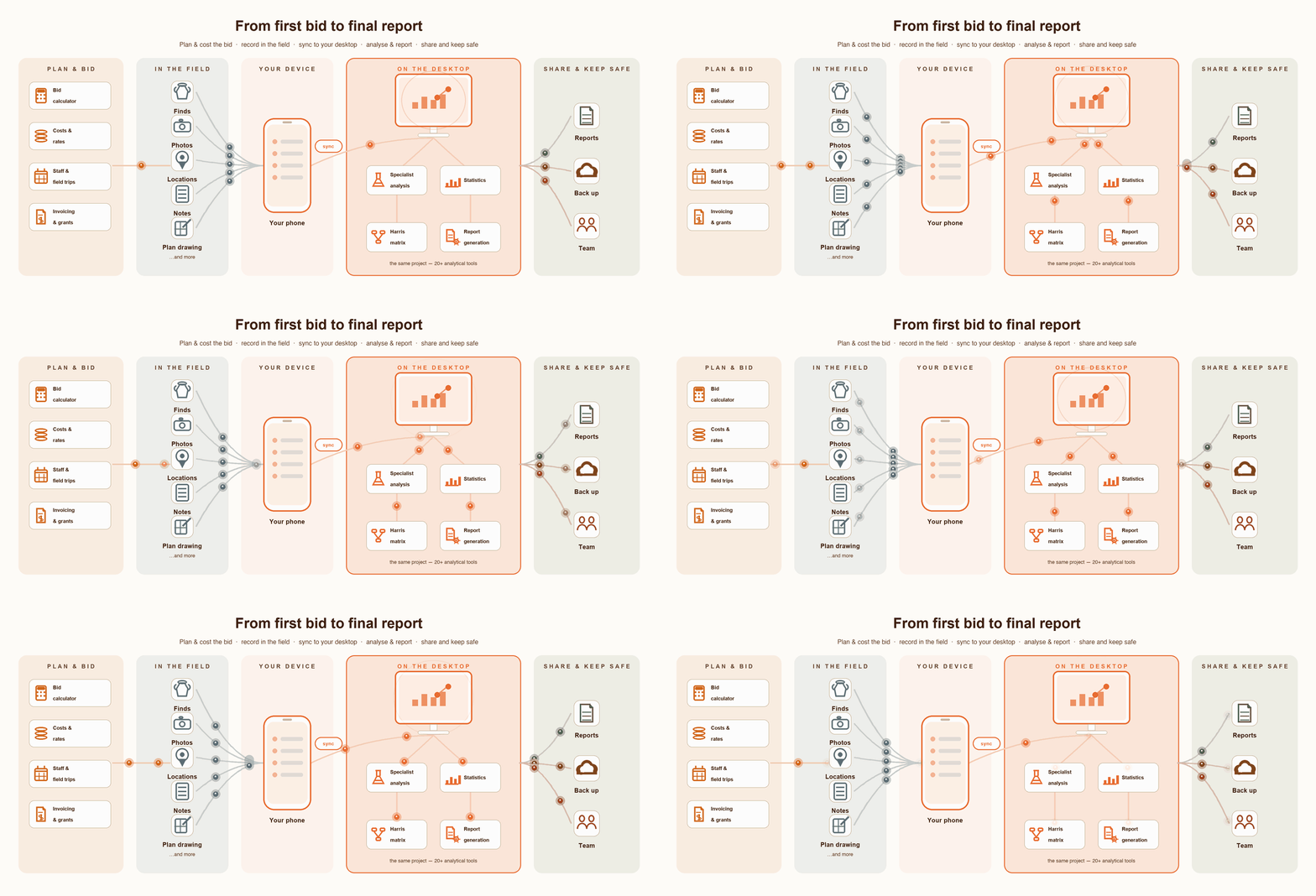
Bid Preparation
Before the project starts, you need to win the contract. Excavata's Bid Calculator builds your fee proposal from the ground up — labour, direct costs, overheads, margins and contingency — with a live total that updates as you type.
- ●Define project phases — Desktop Study, Field Survey, Excavation, Lab Analysis, Report Writing, Client Meetings
- ●Cost labour per phase by role with oncosts auto-applied (superannuation, leave loading, payroll tax)
- ●Add direct costs — vehicles, accommodation, equipment hire, subcontractors, lab fees
- ●Set overhead percentage, margin and contingency
- ●Save standard roles to the Rates Library for reuse across bids
- ●Export a professional Client Fee Proposal PDF — generated with your company logo, hides internal rates and margins, safe to send directly to the client
- ●Keep the full internal breakdown separately as CSV or PDF
Project Setup
The bid is accepted. Now configure the project in Excavata and get the team ready for the field.
- ●Create the project with client details and project information
- ●The accepted bid price is already set as the contract value
- ●Add team members and assign roles
- ●Create sites within the project
- ●Choose recording methodology per site — Context recording for urban or complex stratigraphy, Layer/Spit recording for open area excavation
- ●Set up GIS layers and import existing spatial data
- ●Configure custom recording fields if needed
- ●Send the project to field team mobile devices via Excavata Mobile
Budget Tracking
While the project runs, track costs against the accepted bid in real time. The project manager monitors the budget on desktop while the field team captures expenses on mobile — everything meets in the Budgeting module.
Desktop Project Manager
- ●Monitor actual spend vs bid estimate per phase
- ●Log staff hours and labour costs
- ●Record invoices and payments as they occur
- ●Track outstanding balance in real time
- ●Manage variation orders if scope changes
Mobile Field Team
- ●Capture expenses in the field the moment they happen
- ●Photograph receipts immediately — camera, gallery or PDF
- ●Tax toggle for automatic GST/VAT calculation
- ●Works offline — syncs when back in range
- ●Expenses appear in desktop Budgeting automatically
Field Data Collection
The field team records all excavation data on mobile devices. Excavata supports both major recording methodologies, and all data syncs to desktop for review and QA.
Context Recording
- ●Record context sheets on mobile with structured forms
- ●Observed inclusions selection
- ●Bulk bagged artifact recording
- ●Supervisor sign-off per context
- ●GPS location capture
- ●Photos and measurements linked to contexts
Layer / Spit Recording
- ●Record layers and spits with depths and elevations
- ●Inclusions and finds per spit
- ●Total station integration for precise survey
- ●Supervisor sign-off
- ●Nine-point depth grid
- ●Plan drawing on tablet at the trench edge, or photo capture and register paper maps directly into the project
Finds & Lab Analysis
Back in the lab, specialists catalogue and analyse the finds assemblage. Every record links back to its excavation context, maintaining full provenance from trench to publication.
- ●Record and catalogue artifacts with full provenance to context or spit
- ●Bulk bag processing workflow — unprocessed, in progress, complete
- ●Specialist analysis forms — ceramic, faunal, botanical, isotope, XRF, human remains, soil and flotation, pollen and phytolith, metalwork, residue and use-wear
- ●Lab processing status tracking across the entire assemblage
- ●QR label printing for finds and samples
- ●Photos and figures linked directly to find records
- ●Export finds data to PAST statistical software for further analysis
Excavata's built-in Statistics Dashboard gives you immediate analytical insight without leaving the app. Run distribution analyses to map where artifact classes cluster across the site, compare ceramic or faunal assemblages between contexts or phases, track recording completeness to identify gaps before you leave the field, and generate frequency charts for finds by period, material or type. Spot patterns — a concentration of burnt bone in a single context, a decline in worked flint across spits, a stratigraphic unit with unusually high ceramic diversity — directly from your project data, ready to feed straight into your report narrative.
Report Generation
The fieldwork is done, the finds are analysed. Excavata helps you assemble the report — pulling data, figures, matrices and narratives directly from the project record.
- ●AI-assisted report narratives — generate draft text for context descriptions, site summaries and project overviews
- ●Report assembler — build the report structure and pull in recorded data automatically
- ●Figures and plates — organise site photos into report-ready plates with captions and figure numbers
- ●Harris Matrix — generate stratigraphic sequence diagrams automatically from recorded relationships
- ●Tables and charts — auto-generated from recorded data
- ●Export the complete report package — PDF, figures, data appendices
Project Close-Out
The report is delivered. Close out the project with a clear picture of where the money went and whether it came in on budget.
- ●Raise the final invoice and track it through to payment
- ●Budget reconciliation — actual spend vs bid estimate, final profit or loss
- ●Export financial records to your accounting system — Xero, MYOB, QuickBooks, or university finance (SAP Concur, TechnologyOne, Workday)
- ●Set project status to complete
- ●Archive all project data — field records, finds, photos, plans, reports
- ●Export data package for heritage authority submission if required
See Excavata in action
From the first bid to the final report, Excavata keeps your project data, finances and team connected. Get in touch to learn more or request a demo.